
Building a No Frills Meditation App


This is the story of how I built Just Breathe, a no-frills meditation app: part personal journey, part technical walkthrough.
I first heard about the benefits of meditation years ago on a podcast. An expert practitioner was being interviewed on a health podcast and said if the benefits of meditation were available as a pill, it would make some pharmaceutical company billions in profits. Benefits such as: lower stress, improved sleep, reduced anxiety, better blood pressure, improved focus, clearer thinking, enhanced performance on cognitive tasks, even longevity. Intrigued, I bought the book, especially since the author billed it as 'no BS.'
But then I got to the chapter about people meditating in the forest, claiming they could intuit which plants were safe to eat or use as medicine based on what the plants told them during meditation. While I'm sure some people genuinely feel that the plants are communicating with them, that chapter reminded me why I've been skeptical of meditation in the past.
That's been my issue with meditation all along. I'm open to the science, but not the pseudoscience. I also didn't find it easy: trying to meditate on my own usually resulted in zoning out or falling asleep. So I turned to a tech solution.
Digital Helpers
I wanted something simple: a gentle breathing reminder to help me focus. But everything I tried had problems.
- Guided meditation apps required subscriptions that never felt worth the recurring cost.
- Free versions bombarded me with ads and account creation demands.
- Distractions Even in the health and wellness space, many apps are still designed around the attention economy: upsells, notifications, and nudges to buy extras instead of just letting you breathe.
- Tone Full of vague spiritual platitudes and ambient whale sounds. Not my thing.
- Meditation podcasts Same issue - plus ads - and often just as "out there."
- YouTube Forget it. You sit down to meditate and end up watching cat videos for an hour.
After a while I realized I wasn't looking for "content" at all. I didn't need a guru, a playlist, or a subscription. I just needed a technique, something concrete, and grounded in science.
Simple Discovery
Then I read the book Breath: The New Science of a Lost Art, by James Nestor. It made a strong case for a simple, yet effective practice: breathing in through the nose for 5.5 seconds, and out through the nose for 5.5 seconds. Just a few minutes a day, the author argued, could activate the parasympathetic nervous system, improve oxygen saturation, and more.
Nestor calls this technique Resonant (or Coherent) Breathing. He describes it as:
A calming practice that places the heart, lungs, and circulation into a state of coherence, where the systems of the body are working at peak efficiency. There is no more essential technique, and none more basic.
The instructions were straightforward:
- Sit up straight, relax the shoulders and belly, and exhale.
- Inhale softly for 5.5 seconds, expanding the belly as air fills the bottom of the lungs.
- Without pausing, exhale softly for 5.5 seconds, bringing the belly in as the lungs empty.
- Repeat at least ten times, more if possible.
That clicked. Finally, here was something grounded and practical, stripped of mysticism. But when I tried to create a custom meditation session around this technique, new problems emerged.
Breathing Math
The technique sounds simple, but here's what happened in practice:
Counting 5.5 seconds wasn't intuitive, whole numbers felt easier, but stressing about the additional half second defeated the purpose.
Constant counting was distracting, pulling attention away from the feeling of the breath.
Mind wandering often led to zoning out and forgetting the pattern altogether.
Knowing when to stop required a timer, but even the "When Timer Ends" tones that sounded like they should be calming — Slow Rise, Dreamer — still jolted me out of whatever calm I'd built.
After running into all these frictions, I realized I needed a bare-bones tool that would:
- Guide me through 5.5-second breaths with voice prompts
- Keep me on track without counting
- End sessions gently, not abruptly
That was it. Nothing more. And the cue had to be spoken words — "Breathe in", "Breathe out", "All done" — not a tone I'd have to interpret. I couldn't find something like this so decided to build it.
Building My Own
I opened VS Code, created a new project, and asked my AI assistant (at the time, one of the free models via VSCode Copilot) to help me put together something simple and mobile-friendly. No frameworks, no accounts, no backend. Just vanilla JavaScript and CSS. Here's the prompt I used:
After submitting that prompt and a good deal of iteration to resolve issues, here are the results:
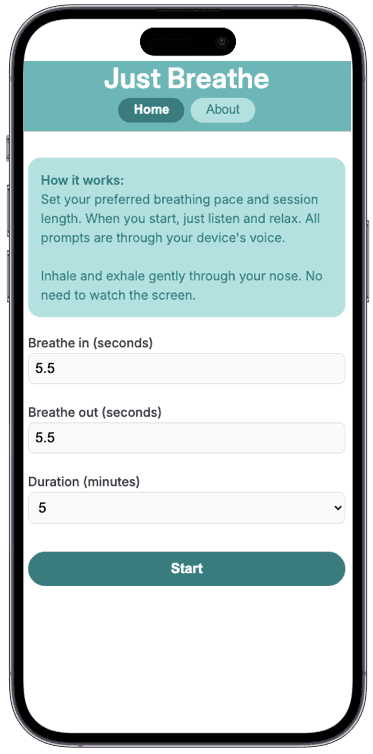
After clicking Start, it looks like this in the middle of the session:
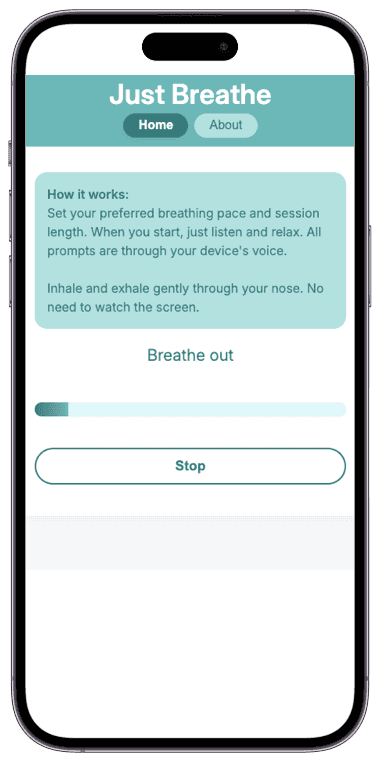
While the session is running the user hears "Breathe in", then 5.5 seconds later (or whatever value they set in the form), "Breathe out". It repeats in this pattern until the session is complete.
From Prototype to Structure
The first working version came together quickly, but it wasn't especially tidy. The AI had no trouble producing something functional, but the early iterations tended toward a single, intertwined script where timing, UI updates, voice prompts, and state all lived together. Getting from "it works" to maintainable code involved extensive back-and-forth: requesting smaller files, clearer responsibilities, and separation of concerns.
What follows walks through some of the technical choices that fell out of that process.
Technical Highlights
This app is structured as follows:
.
├── assets
│   └── fonts
│       ├── InterVariable-Italic.woff2
│       └── InterVariable.woff2
├── index.html
├── js
│   ├── about.js
│   ├── index.js
│   ├── main.js
│   ├── session.js
│   ├── userPrefs.js
│   └── voice.js
└── styles
    ├── fonts.css
    ├── index.css
    ├── reset.css
    ├── variables.css
    └── (additional component styles...)
Where index.html loads the entry point styles and code:
<head>
  <!-- other stuff... -->
  <link rel="stylesheet" href="./styles/index.css">
  <script type="module" src="./js/index.js" defer></script>
</head>
Vanilla Stack
Using native ES modules means no bundler or transpiler is needed, and the whole app stays readable to anyone curious about the code. For example, the js/index.js entrypoint imports the main and about modules so the views can be toggled (no fancy router needed here for just two views):
// js/index.js
import { renderMainView } from './main.js';
import { renderAboutView } from './about.js';

const appView = document.getElementById('app-view');
const navMain = document.getElementById('nav-main');
const navAbout = document.getElementById('nav-about');

function showView(view) {
  if (view === 'about') {
    renderAboutView(appView);
  } else {
    renderMainView(appView);
  }
}

navMain.addEventListener('click', () => showView('main'));
navAbout.addEventListener('click', () => showView('about'));

// Default view
showView('main');
The entire app runs as a static site with no framework, no auth, and no build process — just plain HTML, JavaScript modules, and CSS, deployed via GitHub Pages using the gh-pages npm package. This keeps maintenance simple.
With the architecture in place, the heart of the app is the breathing session itself. The session loop manages timing, state transitions, and voice prompts.
Session
The session loop keeps track of time, alternates between inhale/exhale and updates the progress bar. It's driven by requestAnimationFrame, which runs once per frame for smooth updates. This approach provides more precise timing than cascading setTimeout calls.
Values like inSec and outSec come from a form submission handler in main.js — passed into the session when the user clicks Start. You'll also notice calls to speak(...) for voice prompts, which I'll explain in the next section.
// js/session.js
function updateState() {
  if (!running) return;

  // Update progress bar based on overall session completion
  elapsed = Date.now() - sessionStart;
  let percent = Math.min(1, elapsed / totalMs);
  progressEl.style.width = (percent * 100) + '%';

  // Check if we're at the end of the session but in "in" state
  if (elapsed >= totalMs && state === 'in') {
    // Let user finish last out-breath before ending
    state = 'out';
    breathStart = Date.now();
    breathMs = outSec * 1000;
    speak('Breathe out');
    stateEl.textContent = 'Breathe out';
  }

  // Check if session is complete and we're on the final out-breath
  if (elapsed >= totalMs && state === 'out') {
    running = false;
    // Wait for the final breath to complete before showing "All done"
    setTimeout(() => {
      stateEl.textContent = 'All done!';
      speak('All done');
      progressEl.style.width = '100%';
      finishSession(true);
    }, outSec * 1000);
    return;
  }

  // Calculate how long we've been in the current breath phase
  let breathElapsed = Date.now() - breathStart;

  // Switch inhale/exhale when time for the current breath is up
  if (breathElapsed >= breathMs) {
    if (state === 'in') {
      state = 'out';
      breathMs = outSec * 1000;
      speak('Breathe out'); // Voice prompts (explained in next section)
      stateEl.textContent = 'Breathe out';
    } else {
      state = 'in';
      breathMs = inSec * 1000;
      speak('Breathe in');
      stateEl.textContent = 'Breathe in';
    }
    // Reset the timer for the new breath phase
    breathStart = Date.now();
  }

  // Continue the animation loop (synced to display refresh rate)
  requestAnimationFrame(updateState);
}
Rather than waiting for exact intervals using timers, the app continuously checks how much actual time has elapsed using requestAnimationFrame. This schedules the loop to run in sync with the browser's repaint cycle. On each frame, the function compares the current time against when the breath phase started. When the target duration is reached (for example, 5.5 seconds for an inhale), it transitions to the next phase and resets the timer.
Voice-Guided
All prompts - "Breathe in", "Breathe out", and "All done" at the end - are spoken using the Web Speech API, so the user doesn't need to watch the screen during the session and knows when it's over. The browser provides the voice, which may sound different depending on the operating system and settings.
The implementation includes some tuning to make the voice guidance more pleasant during meditation. The speech rate is slowed down slightly (0.85), and the pitch is lowered a bit (0.9) to create a calmer, more soothing tone. The function also cancels any previous utterances before speaking - this prevents voice prompts from queuing up or overlapping if something unexpected happens.
// js/voice.js
export function speak(text) {
  if (!('speechSynthesis' in window)) return;
  const utter = new window.SpeechSynthesisUtterance(text);
  utter.rate = 0.85;    // Slightly slower for a calmer pace
  utter.pitch = 0.9;    // Slightly lower for a soothing tone
  utter.lang = 'en-US';
  window.speechSynthesis.cancel(); // Stop any previous utterances
  window.speechSynthesis.speak(utter);
}
Staying Awake
Sessions request a screen wake lock so the device won't lock up in the middle of the breathing exercise:
// js/session.js
async function requestWakeLock() {
  try {
    if ('wakeLock' in navigator) {
      wakeLock = await navigator.wakeLock.request('screen');
      wakeLock.addEventListener('release', () => {
        wakeLock = null;
      });
    }
  } catch (err) {
    // Wake Lock may fail due to battery saver mode or permissions,
    // A future version of this app may inform user of this issue.
  }
}
Custom Preferences
Just Breathe remembers your breathing pace and session duration between visits, so the form pre-populates with your last used values. This is implemented using local storage. To avoid magic strings scattered throughout the code, keys are defined in a central constants module:
// js/constants.js
export const NAMESPACE = 'justBreathe';
export const PREFS_KEY = `${NAMESPACE}:prefs`;
The full userPrefs.js module handles saving, loading, and validation in one place:
// js/userPrefs.js
import { PREFS_KEY } from './constants.js';

export const DEFAULT_PREFS = { inSec: 4.5, outSec: 4.5, duration: 10 };

export function savePrefs({ inSec, outSec, duration }) {
  try {
    localStorage.setItem(PREFS_KEY, JSON.stringify({ inSec, outSec, duration }));
  } catch (e) {
    // ignore storage errors
  }
}

export function loadPrefs() {
  try {
    const raw = localStorage.getItem(PREFS_KEY);
    if (!raw) return { ...DEFAULT_PREFS };
    const prefs = JSON.parse(raw);
    return {
      inSec: typeof prefs.inSec === 'number' && prefs.inSec >= 1 && prefs.inSec <= 15 ? prefs.inSec : DEFAULT_PREFS.inSec,
      outSec: typeof prefs.outSec === 'number' && prefs.outSec >= 1 && prefs.outSec <= 15 ? prefs.outSec : DEFAULT_PREFS.outSec,
      duration: typeof prefs.duration === 'number' && prefs.duration >= 1 && prefs.duration <= 180 ? prefs.duration : DEFAULT_PREFS.duration,
    };
  } catch {
    return { ...DEFAULT_PREFS };
  }
}
loadPrefs returns the defaults if nothing is stored yet, and falls back to them if parsing fails — for example if local storage was manually edited or corrupted. Each value is also range-checked: in/out seconds must be between 1–15, and session duration between 1–180 minutes. This ensures the app always starts in a sensible state regardless of what's in storage.
Add to Home Screen
Just Breathe isn't in an app store, but it supports "Add to Home Screen", giving it an app-like presence: a standalone window, home screen icon, and quick launch. This works with an app manifest, which is linked in index.html:
<link rel="manifest" href="site.webmanifest">The manifest defines the app name, icons, start URL, and display mode:
{
  "name": "Just Breathe",
  "short_name": "Just Breathe",
  "icons": [
    {
      "src": "web-app-manifest-192x192.png",
      "sizes": "192x192",
      "type": "image/png",
      "purpose": "maskable"
    },
    {
      "src": "web-app-manifest-512x512.png",
      "sizes": "512x512",
      "type": "image/png",
      "purpose": "maskable"
    }
  ],
  "theme_color": "#ffffff",
  "background_color": "#ffffff",
  "display": "standalone"
}
iOS uses the icon and page title defined in index.html:
<link rel="apple-touch-icon" sizes="180x180" href="apple-touch-icon.png" />
<meta name="apple-mobile-web-app-title" content="Just Breathe" />
CSS Modularity
In addition to the JavaScript setup, the CSS is organized into multiple smaller files and brought together in index.css using @import:
/* styles/index.css */
@import './fonts.css';
@import './reset.css';
@import './variables.css';
@import './global.css';
@import './app.css';
/* additional component styles... */Final Thoughts
I now use Just Breathe daily after my workout. It's simple and solves exactly the problem I set out to fix: guided breathing without the baggage. This project reminded me why I love building for the web. With just HTML, CSS, and JavaScript (and an AI assistant!), you can quickly create useful tools that work everywhere, require no installation, and cost nothing to run.
If you want to try it, Just Breathe works in any modern browser and takes seconds to start using. Add it to your home screen for quick access. I hope it helps you find a moment of calm in your day.


