
Audit a Rails Project with the Thoughtbot Audit Skill


I maintain a small Rails app to power cookie-free page analytics, and search on this blog. It's been chugging along for about five years. Like many solo side projects, it grew over time, and accumulated some tech debt. So when I came across this Rails Audit Skill, that analyzes a Rails codebase and produces a structured audit report based on Thoughtbot's best practices, I decided to run it against mine.
This post walks through how I ran the audit against my project, a few of the findings the audit caught, and a workflow I developed to turn the report into prioritized GitHub issues so improvements can be tackled one at a time.
What the Skill Does
The Rails Audit skill walks your codebase against Thoughtbot's Ruby Science and Testing Rails guidance, covering testing practices, security, code design (skinny controllers, POROs, ActiveModel), Rails conventions, database and migration hygiene, external service handling, performance antipatterns, and Ruby style. It can optionally run SimpleCov for test coverage and RubyCritic for code quality metrics if you opt in when prompted. The output is a single markdown report grouped by category and severity.
Installation is one command from the skill's README:
git clone https://github.com/thoughtbot/rails-audit-thoughtbot \
  ~/.claude/skills/rails-audit-thoughtbot
There are three ways to invoke it:
| Context | Command |
|---|---|
| Terminal, from Rails project root | claude audit |
| Inside a Claude session | /rails-audit-thoughtbot |
| Inside a Claude session, scoped | /rails-audit-thoughtbot audit controllers |
Here's the prompt I provided:
/rails-audit-thoughtbot save all reports, output etc to scratch/rails-audit/
That trailing instruction is a free-form argument. The skill picks it up and routes its outputs into scratch/ instead of the repo root, which keeps AI-generated artefacts out of git, as I have scratch in my global gitignore file.
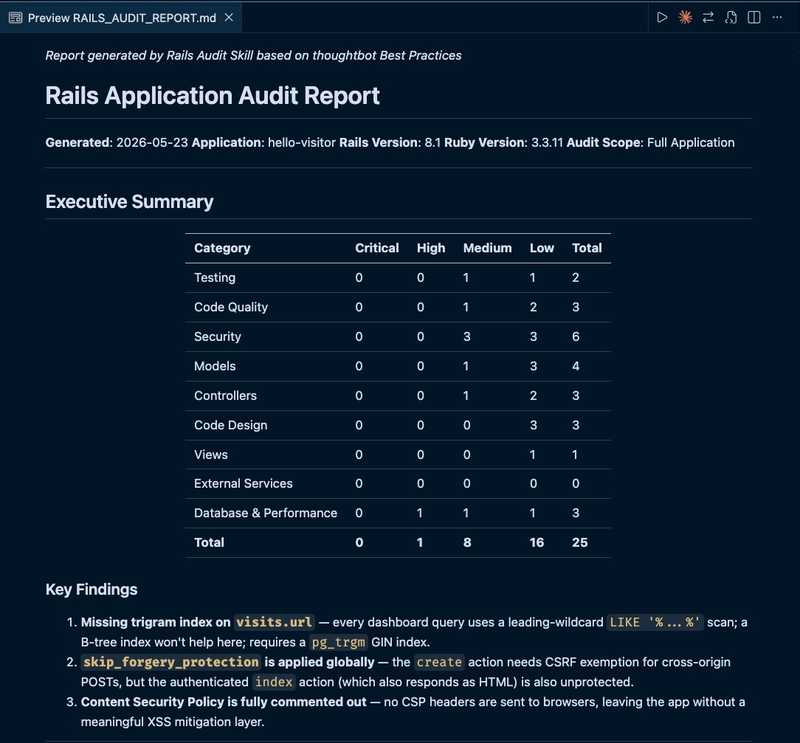
The audit ran in under 10 minutes. It generated a single markdown file named RAILS_AUDIT_REPORT.md with an Executive Summary, a Key Findings list, then the findings themselves grouped by category (Testing, Security, Models, Controllers, Database & Performance, etc.) with detailed explanations and recommended fixes. Within each category, issues are listed as high, medium, or low severity. The report closes with a Recommendations Summary that re-groups the findings into Quick Wins, Short-term, and Long-term buckets.
Here's a snippet of what the beginning of the report looked like:
And the recommendations section at the end:
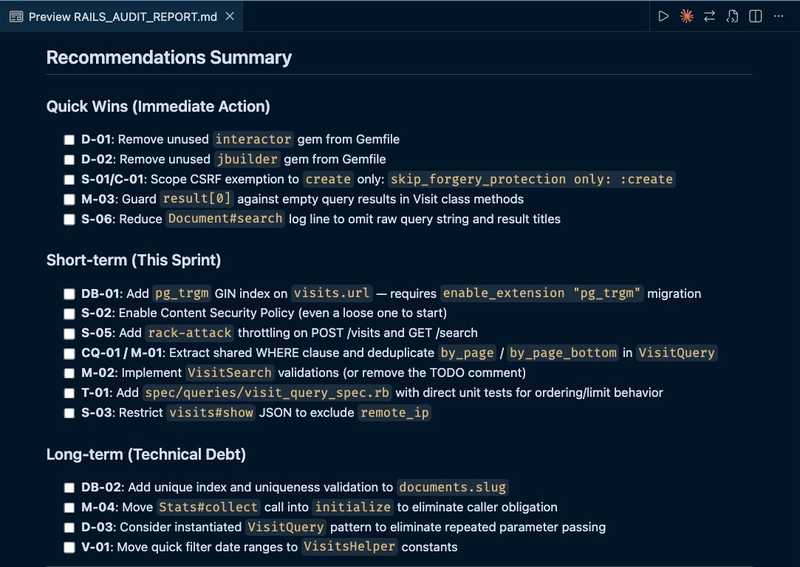
The letter codes beside each issue are a naming scheme the audit defines: a category abbreviation (S = Security, DB = Database, T = Testing, etc.) concatenated with a sequence number within that category.
Issues Discovered
The full report had over 20 findings. This section walks through a sampling of issues it found.
Missing trigram index
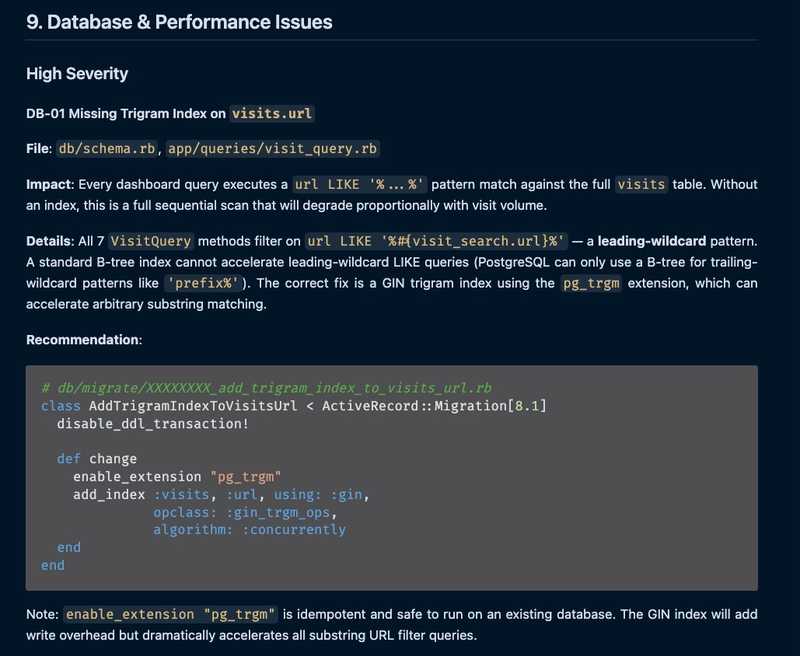
This was marked as high severity in the Database & Performance section. Every dashboard query filters visits by URL with LIKE '%...%', a leading-wildcard pattern that a standard B-tree index can't accelerate. The fix is to enable the pg-trgm extension, then add a GIN trigram index on visits.url.
I'd noticed the dashboard getting sluggish over the years but never had time to dig into it. Fixing it turned out to be relatively easy by adding a migration.
The audit flagged it as:
Class with no dedicated tests
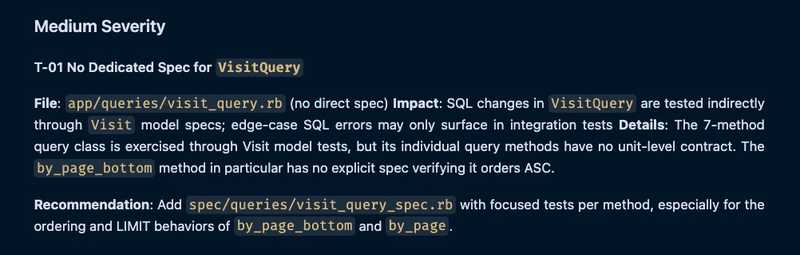
app/queries/visit_query.rb is the SQL layer behind the analytics dashboard. It had no spec file of its own. Its query methods were exercised indirectly through integration tests, but not every branch was covered, and the SQL behaviour itself wasn't pinned down anywhere. The audit recommended a dedicated spec file so each query method has its own focused tests.
The relevant finding:
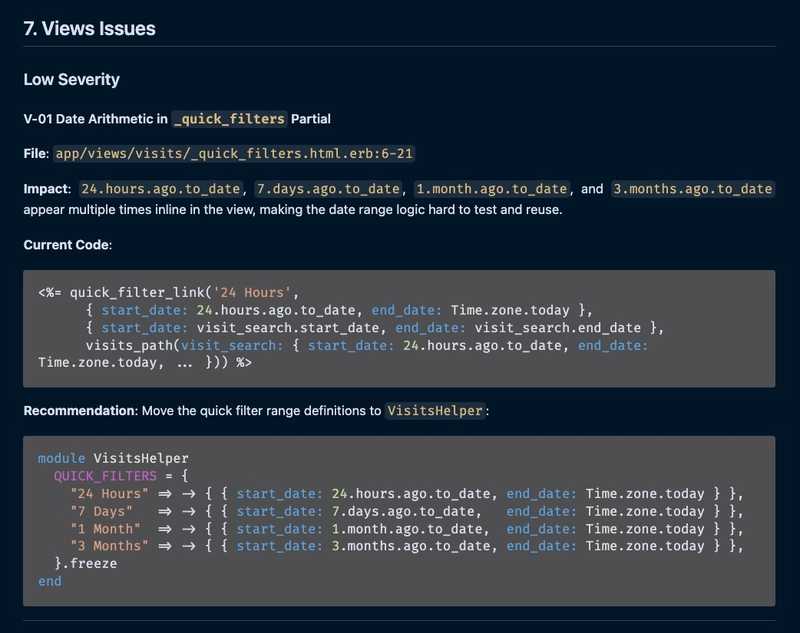
Date arithmetic in view partial
The analytics dashboard's "Quick Filters" partial has buttons for 24 Hours, 7 Days, 1 Month, 3 Months. The 24.hours.ago.to_date / 7.days.ago.to_date / 1.month.ago.to_date literals were duplicated directly in the ERB. Each appeared three times: once for the link's target, once for the active-state check, once for the URL. The audit recommended pulling the ranges into VisitsHelper as a constant hash so the view loops over a single source of truth.
This is a view-layer organization smell: the code works, but having the logic directly in the view makes it difficult to test and re-use.
Here's what it caught:
From Audit Report to Backlog
The audit report is a single markdown file, good for a one-time read. To work through the improvements I needed each finding as its own GitHub issue, labelled by severity and area so I could pick whatever fit my available time. The next sections walk through how I went from audit report to organized GitHub issues.
Draft One Issue per Finding
The first step was to split the report into one markdown file per finding, so I could think about each one in isolation before any of it touched GitHub. My prompt:
read: scratch/rails-audit/RAILS_AUDIT_REPORT.md i want to split out the recommended improvements into separate tickets, and actually i dont completely understand all of them so each one needs a writeup like what the problem is and why we're addresing it and what expected results are and how the agent can verify its own work that the change was done correctly
so please create a new dir: scratch/rails-audit/issues and under there writeup a file per each issue with the title and description, eventually these will get created as github issues so we can address them one at a time
The key parts of this prompt are asking for the why behind each finding so each ticket would teach me something rather than just hand off a task to an agent, and asking for a verification step so every issue carries its own success criteria when an agent later picks it up.
Define Labels
After reviewing the issue files, the next obvious step would be to ask Claude to create each one as a GitHub issue in the repo. But I was concerned about a dump of so many issues with no way to organize them. The existing repo only had the default GitHub labels (bug, help wanted, good first issue, etc), which weren't enough to filter by severity or area, so I wanted a label scheme in place before any issues got created.
I asked Claude to read the audit report and the issue files I'd just generated, and propose a set of new labels:
read scratch/rails-audit/RAILS_AUDIT_REPORT.md then quickly skim through all the issue md files in: scratch/rails-audit/issues specifically at severity and category and just the problem statement then look at what github issue labels are already available in this project then writeup as sibling to the audit report a file like github-issue-new-labels.md and propose what new labels would be useful for later when we create all these issues, and choose colors as well i use dark theme
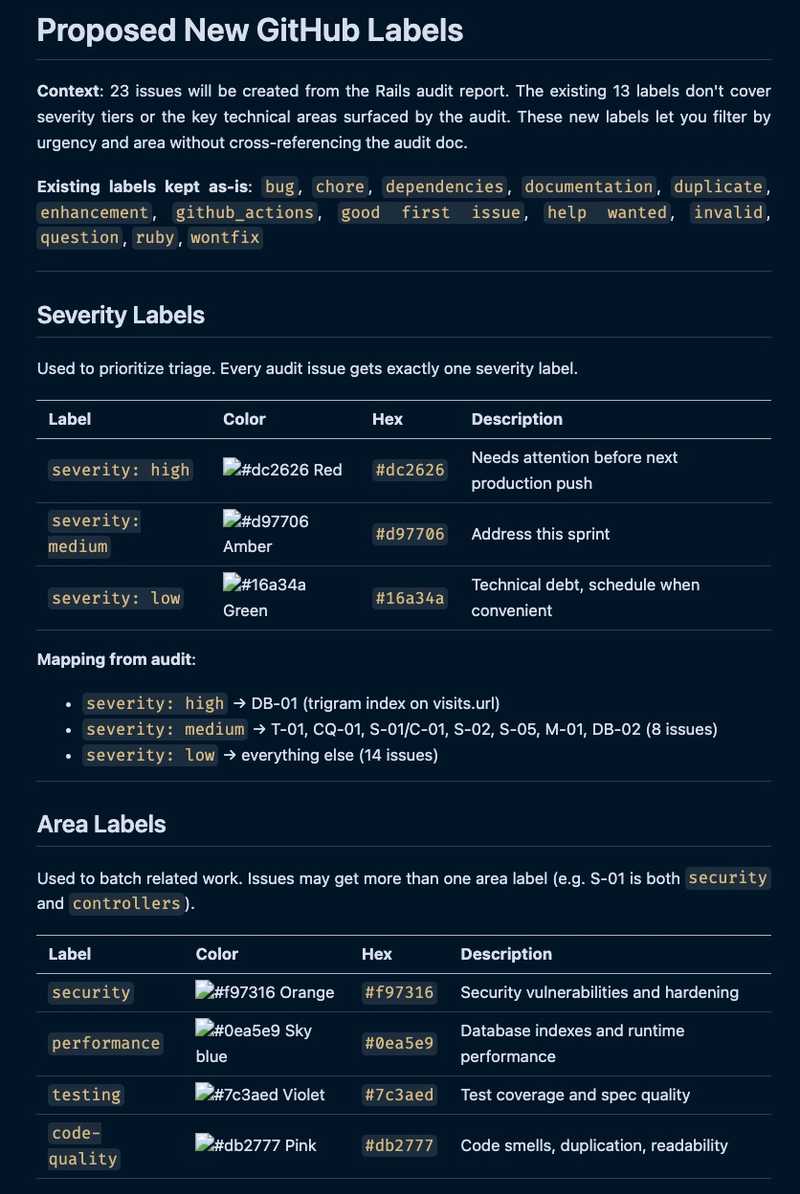
Claude came back with eight labels across three groups: severity (high/medium/low), area (security/performance/testing/code-quality), and a single audit origin tag so I could later filter back to the source. Here's a snippet of the github-issue-new-labels.md I asked it to create:
Apply Labels to Issue Files
The label scheme lived in github-issue-new-labels.md. The issue files didn't know about it yet. So my next prompt was:
now update all the md files in scratch/rails-audit/issues with all the labels each should get
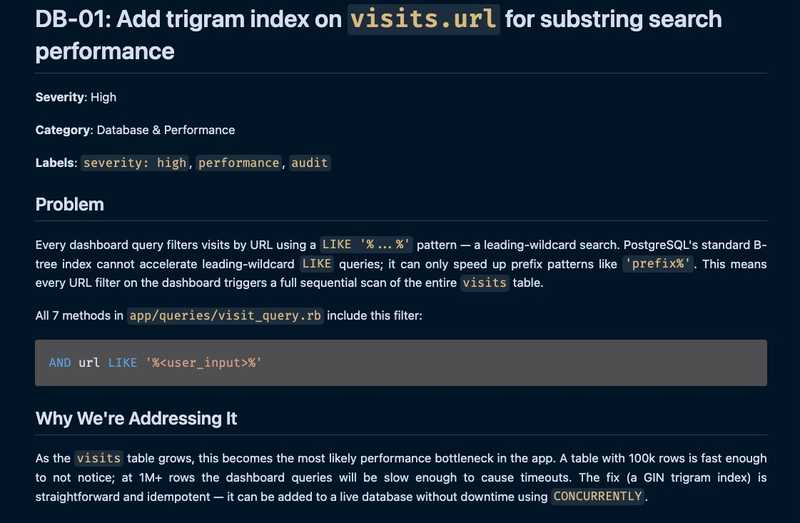
After Claude had done that, each issue file now had a **Labels** line declaring exactly which labels it should be created with. Here's a snippet of one of the markdown issue files scratch/rails-audit/issues/add-trigram-index-visits-url.md, after Claude updated it with suitable labels:
Create Labels
Up to this point everything was written in markdown files in my local scratch dir. Now the labels needed to actually exist on GitHub before I could attach them to issues. My next prompt:
read: scratch/rails-audit/github-issue-new-labels.md then create the new labels
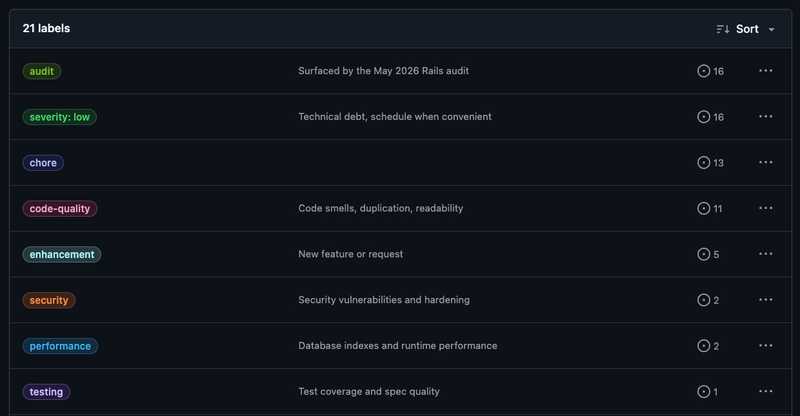
The proposal file already had the names, colors, and descriptions; Claude just had to translate them into gh label create calls. Here are a few of them on GitHub:
Create Labelled Issues
By this point all the thinking was in the issue files: each one had its title, body, and labels. The next prompt was to get Claude to create the issues and label them accordingly:
for each md file in scratch/rails-audit/issues create the issue
Here's a sampling of the issues listing on GitHub:
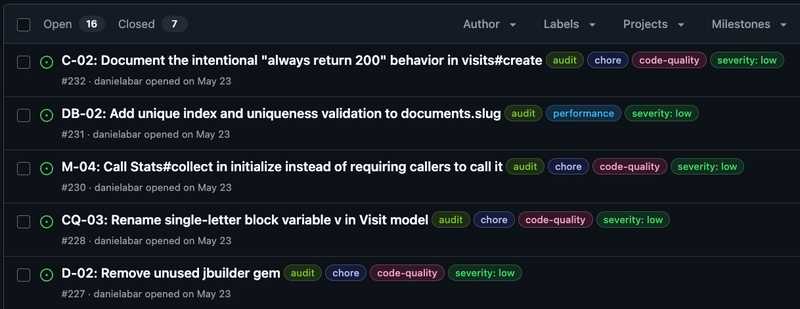
With the issues organized and labelled on GitHub, I could shift from the audit work to the actual code improvements. I started with severity: high issues, then moved into the medium pile. Beyond that there's no schedule; I work one or two issues on a weekend when I have time. Because every finding is a labelled issue, I can drop in and out without losing context.
Time Spent
Before AI, a thorough manual audit on a project this size would have taken days, and for a side project, would never have felt worth the effort. This took an afternoon. About 72 minutes was active Claude conversation; the rest was me reading the output files, synthesizing the findings, and organizing the work into something I could chip away at over time.
The Skill is Opinionated
If you're thinking of trying this on your Rails project, be aware that the audit reflects Thoughtbot's house style: business logic in models, POROs, or ActiveModel objects rather than service objects; names that read as Ruby objects (Stats#collect) rather than as patterns (StatsCollector#call); skinny controllers, decomposed models.
For my project, this was pretty well aligned. It may read as wrong on a codebase built around Interactor / call / service objects. The skill's README doesn't document any config for projects that intentionally diverge. What you could try is pass intent in the free-form arg, something like "this project uses the Interactor pattern deliberately; don't flag it as an issue." I haven't tested how reliably the skill respects that, but it's what I'd try first for a project that has different conventions.
Final Thoughts
The Rails Audit skill is worth running on any project that's been around awhile. Think of it as a brief consulting engagement: fresh eyes on code you've gotten too used to. The findings still need judgment: some land immediately, others won't fit your conventions, but it's a great starting point for improvements. The trigram index was the most satisfying find, a real performance issue I'd been noticing for years.
If you want to try the post-audit workflow on your own project (splitting the report into individual issue files, defining and applying labels, creating labelled issues), I bundled those steps into a companion gist. Install the Thoughtbot skill and run the audit first, then drop the playbook into scratch/rails-audit/AGENT_PLAYBOOK.md and point Claude at it with "read scratch/rails-audit/AGENT_PLAYBOOK.md and execute it".


